0%

Introduction

今天我们来介绍一下Angular中的NavigationExtras接口,我们在使用Router进行导航时,可以通过NavigationExtras接口来传递额外的导航参数。

NavigationExtras接口定义如下:

1
2
3
4
5
6
7
8
9
10
11
12
interface NavigationExtras {
override relativeTo?: ActivatedRoute;
override queryParams?: Params;
override fragment?: string;
override queryParamsHandling?: QueryParamsHandling;
override preserveFragment?: boolean;
override onSameUrlNavigation?: OnSameUrlNavigation;
override skipLocationChange?: boolean;
override replaceUrl?: boolean;
override state?: { [k: string]: any; };
readonly override info?: unknown;
}

relativeTo

relativeTo属性是一个ActivatedRoute对象,用来指定导航的相对路径。假设有如下路由配置,ParentComponent下有两个子路由ListComponentChildComponent.

1
2
3
4
5
6
7
8
9
10
11
[{
path: 'parent',
component: ParentComponent,
children: [{
path: 'list',
component: ListComponent
},{
path: 'child',
component: ChildComponent
}]
}]

如果我们当前位于ChildComponent,想要导航到ListComponent,可以使用relativeTo属性来指定相对路径,其中..表示上一级路径,也就是ParentComponent../list表示导航到parent/list路径,也就是ParentComponent下的ListComponent`。

1
2
3
4
5
6
7
@Component({...})
class ChildComponent {
constructor(private router: Router, private route: ActivatedRoute) {}
go() {
router.navigate(['../list'], { relativeTo: this.route });
}
}

queryParams

queryParams属性是一个Params对象,用来指定导航时的查询参数。比如我们要导航到/list路径,并且带上查询参数page=1,可以使用queryParams属性。

1
2
3
4
5
// Navigate to /results?page=1
router.navigate(['/results'], { queryParams: { page: 1 } });

// Navigate to /results?page=1&sort=desc
router.navigate(['/results'], { queryParams: { page: 1, sort: 'desc' } });

fragment

fragment属性是一个字符串,用来指定导航时的fragmentfragment是以#号开头的标识符。比如我们要导航到/list路径,并且带上片段标识符top,可以使用fragment属性。

1
2
// Navigate to /results#top
router.navigate(['/results'], { fragment: 'top' });

queryParamsHandling

queryParamsHandling属性是一个枚举类型,用来指定导航时如何处理查询参数。有以下几种取值:

  • preserve : Preserve parameters in original url and discard new parameters in target url
  • merge : Merge target url query params with original url parameters.

在下面的代码中使用了preserve参数,表示保留原始url中的查询参数。而目标url中的查询参数{page: 2}将被忽略。导航结束后,url为/view2?page=1

1
2
3
// from /view1?page=1 to /view2?page=1
router.navigate(['/view2'], { queryParams: { page: 2 }, queryParamsHandling: "preserve"
});

在下面的代码中使用了merge参数,表示将目标url中的查询参数与原始url中的查询参数合并。导航结束后,url为/view2?page=1&otherKey=2

1
2
3
// from /view1?page=1 to /view2?page=1&otherKey=2
router.navigate(['/view2'], { queryParams: { otherKey: 2 }, queryParamsHandling: "merge"
});

需要注意,如果源url和目标url中都有相同的查询参数,那么目标url中的查询参数会覆盖源url中的查询参数。下面的例子中,导航后,url为/view2?page=2&id=2page参数的值被目标url中的值覆盖了。

1
2
// from /view1?page=1 to /view2?page=2&id=2
router.navigate(['/view2'], { queryParams: { page: 2, id: 2 }, queryParamsHandling: "merge"});

preserveFragment

preserveFragment属性是一个布尔值,用来指定导航时是否保留原始url中的fragment标识符。如果设置为true,则保留原始url中的片段标识符,否则忽略。默认值为false

1
2
// from /view1#top to /view2#top
router.navigate(['/view2'], { preserveFragment: true });
1
2
3
4
// from /view1#top to /view2
router.navigate(['/view2']);
// or
router.navigate(['/view2'], { preserveFragment: false });

onSameUrlNavigation

onSameUrlNavigation属性是一个枚举类型,用来指定当导航到相同url时的行为。有以下几种取值:

  • reload : Reload the page
  • ignore : Ignore the navigation
1
2
// from /view1 to /view1
router.navigate(['/view1'], { onSameUrlNavigation: 'reload' });

skipLocationChange

skipLocationChange属性是一个布尔值,用来指定是否在url中添加一个新的历史记录。如果设置为true,则不会添加新的历史记录,导航结束后,浏览器的历史记录不会改变。默认值为false

假设有如下导航:view1 -> view2 -> view3, 如果在view2 -> view3的导航中设置skipLocationChangetrue,则导航结束后,浏览器的历史记录为view1 -> view2,而不是view1 -> view2 -> view3。导航结束后,浏览器的url为/view2,点击浏览器的回退按钮,会回到/view1

注意以上只是本质行为,还有一个视觉行为,如果设置为true,则导航结束后,浏览器的url不会改变,但是页面内容会改变。这样用户在浏览器的历史记录中看不到导航记录。

以下代码从/view1导航到/view2,导航结束后,浏览器的url不会改变,仍然是/view1,但是页面内容会改变, 显示/view2的内容。

1
2
// from /view1 to /view2
router.navigate(['/view2'], { skipLocationChange: true });

replaceUrl

replaceUrl属性是一个布尔值,用来指定导航时是否替换当前的历史记录。如果设置为true,则替换当前的历史记录,默认值为false

假设有如下导航,view1 -> view2 -> view3,如果在view2 -> view3的导航中设置replaceUrltrue,则导航结束后,浏览器url为/view3 浏览器的历史记录为view1 -> view3,而不是view1 -> view2 -> view3(view2view3替换掉)。导航结束后,浏览器的url为/view3,点击浏览器的回退按钮,会回到/view1

1
2
// from /view2 to /view3
router.navigate(['/view3'], { replaceUrl: true });

state

待续

info

待续

References

写好代码不是一件容易的事,代码能够按照预期效果工作只是最低要求,在这个基础上将代码写得简洁,可维护,可以说是一门艺术,今天读了一本书:《The art of readable code》,感触颇深,现摘取一例,与大家分享,为了便于阅读,我将代码简化并用JS重写了一下,先看原始代码:

1
2
3
4
5
6
7
8
9
10
11
12
13
function reply(userResult, permissionResult) {
if (userResult === "SUCCESS") {
if (permissionResult !== "SUCCESS") {
console.log("error reading permissions");
console.log("done");
return;
}
console.log("success");
} else {
console.log(userResult);
}
console.log("done");
}

很简单的一段代码,就是根据输入参数的不同取值,打印不同的log,但是代码里一个嵌套的if语句,导致可读性下降,即使经验再丰富的程序员,也要停留思考一下。罗马不是一天建成的,可读性差的代码也不是一天写成的,通常随着功能的增加,维护人员的增多,代码的可读性会越来越差,其实这段代码一开始逻辑很简单。就是根据userResult的值不同,做不同的处理。

1
2
3
4
5
6
7
8
function reply(userResult) {
if (userResult === "SUCCESS") {
console.log("success");
} else {
console.log(userResult);
}
console.log("done");
}

然后突然有一天增加了一个需求,需要根据permissionResult的值来做进一步的处理,于是该函数多了一个参数,处理逻辑也跟着复杂起来,这便有了文章开头那段代码.

那么如何优化这段代码呢?可以看到外层的if有点头重脚轻的感觉,我们可以采用优先处理negative case的方式,这样可以减少嵌套,提高代码的可读性。

1
2
3
4
5
6
7
8
9
10
11
12
13
14
15
16
function reply(userResult, permissionResult) {
if (userResult !== "SUCCESS") {
console.log(userResult);
console.log("done");
return;
}

if (permissionResult !== "SUCCESS") {
console.log("error reading permissions");
console.log("done");
return;
}

console.log("success");
console.log("done");
}

至此,我们就移出了嵌套的if,使这两个if变为平级结构,可读性好多了。需要注意的是,因为我们在两个if中都使用了return(尽早返回原则),所以需要将末尾的console.log("done")上提到每个if中,否则会导致逻辑丢失。

原书写到这里就结束了,但是我想再进一步,注意到改进后的代码里仍然有多个重复的console.log("done"),我们可以将其提取出来,别忘了那句名言:Don't repeat yourself

在改动之前,先讲一个原理。

if{..., return}结构转换为if-else结构

如果一个函数中有多个if,每个if中都有return,可以考虑将其转换为if-else结构。

1
2
3
4
5
6
7
8
9
10
11
12
13
function foo() {
if (condition1) { // 1
// code block
return;
}

if (condition2) { // 2
// code block
return;
}

// code block
}

等同于:

1
2
3
4
5
6
7
8
9
function foo() {
if (condition1) { // 1
// code block
} else if (condition2) { // 2
// code block
} else {
// code block
}
}

所以之前的代码可以继续优化为下面的形式

1
2
3
4
5
6
7
8
9
10
11
12
function reply(userResult, permissionResult) {
if (userResult !== "SUCCESS") {
console.log(userResult);
console.log("done");
} else if (permissionResult !== "SUCCESS") {
console.log("error reading permissions");
console.log("done");
} else {
console.log("success");
console.log("done");
}
}

最后把重复的console.log("done")提取出来即可。

1
2
3
4
5
6
7
8
9
10
function reply(userResult, permissionResult) {
if (userResult !== "SUCCESS") {
console.log(userResult);
} else if (permissionResult !== "SUCCESS") {
console.log("error reading permissions");
} else {
console.log("success");
}
console.log("done");
}

最后需要注意的是,这种逻辑性的改动,必须经过严密的单元测试才可以。因为只有两个参数,两两组合,所以测试用例有4个:

1
2
3
4
userResult = "SUCCESS", permissionResult = "SUCCESS";
userResult = "SUCCESS", permissionResult = "ERROR";
userResult = "ERROR", permissionResult = "SUCCESS";
userResult = "ERROR", permissionResult = "ERROR";

我们将这四组参数分别传递给修改前和修改后的函数,确保输出结果一致。
这样就完成了对这段代码的重构,提升了可读性和可维护性。

Generate a new Angular project

1
ng new my-app

Generate a new empty workspace

1
ng new my-workspace --create-application=false

Generate a new application in the workspace

1
2
cd my-workspace
ng generate application shell

Install package for a specific project

When you working on a workspace with multiple projects, you can install a package for a specific project.

1
ng add @angular-architects/module-federation --project shell

References:

https://angular.dev/cli

Introduction

This article will introduce Angular Module Federation, a new feature in Webpack 5 that allows you to share code between Angular applications.

Module Federation is a new feature in Webpack 5 that allows you to share code between applications. It enables your application to load remote modules at runtime from another application and share dependencies between applications. This feature is particularly useful for micro-frontends, where you have multiple applications that need to share code.

Steps

Create an empty angular workspace

Option --no-create-application is used to create an empty workspace without an initial application.

1
ng new angular-module-federation --no-create-application

Generate shell application shell

1
2
cd angular-module-federation
ng generate application shell

Generate remote application mfe1

1
ng generate application mfe1

Add plugin @angular-architects/module-federation to shell app

1
ng add @angular-architects/module-federation --project shell --port 4200 --type host

This command will do the following:

  1. Add @angular-architects/module-federation and ngx-build-plus to file package.json under workspace root.

  2. Add command "run:all": "node node_modules/@angular-architects/module-federation/src/server/mf-dev-server.js" to scripts section in file package.json. This command will start the module federation development server, which will run app shell and app mfe1 at the same time.

  3. Add file bootstrap.ts under projects/shell/src folder, its content was copied from main.ts

    1
    2
    3
    4
    5
    6
    import { bootstrapApplication } from '@angular/platform-browser';
    import { appConfig } from './app/app.config';
    import { AppComponent } from './app/app.component';

    bootstrapApplication(AppComponent, appConfig)
    .catch((err) => console.error(err));
  4. Update file projects/shell/src/main.ts to import bootstrap.ts(Note, when a file was imported, it was executed automatically)

    1
    import './bootstrap';
  5. Add file webpack.config.js under projects/shell folder,

    1
    2
    3
    4
    5
    6
    7
    8
    9
    const { shareAll, withModuleFederationPlugin } = require('@angular-architects/module-federation/webpack');
    module.exports = withModuleFederationPlugin({
    remotes: {
    "mfe1": "http://localhost:4200/remoteEntry.js",
    },
    shared: {
    ...shareAll({ singleton: true, strictVersion: true, requiredVersion: 'auto' }),
    },
    });
  6. Add file webpack.prod.config.js under projects/shell folder,

    1
    module.exports = require('./webpack.config');
  7. Update file angular.json under workspace root.

    1. projects/shell/architect/build/builder: "@angular-devkit/build-angular:application" —> ngx-build-plus:browser - The reason for this change is that module federation is a feature provided by WebPack, but "@angular-devkit/build-angular:application" is for ESBuild, so we need to change it to ngx-build-plus:browser which is for WebPack. see here for details.
    2. projects/shell/architect/build/builder/extraWebpackConfig: "projects/shell/webpack.config.js"
    3. projects/shell/architect/build/configurations/production/extraWebpackConfig: "projects/shell/webpack.prod.config.js"
    4. projects/shell/architect/serve/configurations/extraWebpackConfig: "projects/shell/webpack.prod.config.js"
    5. projects/shell/architect/serve/options:
      1
      2
      3
      4
      5
      "options": {
      "port": 4200,
      "publicHost": "http://localhost:4200",
      "extraWebpackConfig": "projects/shell/webpack.config.js"
      }

Note that: extraWebpackConfig is an option from ngx-build-plus, it allows you to add additional webpack configuration to the project.

Add plugin @angular-architects/module-federation to mfe1 app

1
ng add @angular-architects/module-federation --project mfe1 --port 4201 --type remote

This command will do the same thing as the previous command, but for the mfe1 app with a little difference.

  1. webpack.config.js
    1
    2
    3
    4
    5
    6
    7
    8
    9
    10
    11
    const { shareAll, withModuleFederationPlugin } = require('@angular-architects/module-federation/webpack');

    module.exports = withModuleFederationPlugin({
    name: 'mfe1',
    exposes: {
    './Component': './projects/mfe1/src/app/app.component.ts',
    },
    shared: {
    ...shareAll({ singleton: true, strictVersion: true, requiredVersion: 'auto' }),
    },
    });
  2. Serve options in angular.json
    1
    2
    3
    4
    5
    "options": {
    "port": 4201,
    "publicHost": "http://localhost:4201",
    "extraWebpackConfig": "projects/mfe1/webpack.config.js"
    }

Add home component to shell app

1
ng generate component home --project=shell

Add product component to mfe1 app

app mfe1 will expose a component product to shell app.

1
ng generate component product --project=mfe1

Update webpack.config.js in app mfe1

We’ll expose the product component to the shell app.

1
2
3
4
5
6
7
8
9
10
11
const { shareAll, withModuleFederationPlugin } = require('@angular-architects/module-federation/webpack');

module.exports = withModuleFederationPlugin({
name: 'mfe1',
exposes: {
'./Component': './projects/mfe1/src/app/product/product.component.ts',
},
shared: {
...shareAll({ singleton: true, strictVersion: true, requiredVersion: 'auto' }),
},
});

Update app.routers.ts in app mfe1

1
2
3
4
5
6
export const routes: Routes = [
{
path: 'product',
component: ProductComponent,
}
];

Update webpack.config.js in app shell

Note the generated port in webpack.config.js, its value is 4200, we should change it to 4201 since mfe1 runs on this port.

1
2
3
4
5
6
7
8
9
const { shareAll, withModuleFederationPlugin } = require('@angular-architects/module-federation/webpack');
module.exports = withModuleFederationPlugin({
remotes: {
"mfe1": "http://localhost:4201/remoteEntry.js", // <--- 4201
},
shared: {
...shareAll({ singleton: true, strictVersion: true, requiredVersion: 'auto' }),
},
});

Update app.routes.ts in app shell

Add a route path product to load the product component remotely from mfe1.

1
2
3
4
5
6
7
8
9
10
export const routes: Routes = [
{
path: 'home',
component: HomeComponent,
},
{
path: 'product',
loadChildren: () => import('mfe1/Component').then(m => m.ProductComponent),
}
];

Add typescript declaration file decl.d.ts under projects/shell/src

If you don’t add this file, you will get an error when you import the remote module mfe1 in the shell app.

1
declare module 'mfe1/Component';

Workspace structure

Here is the file structure of the workspace till now.

1
2
3
4
5
6
7
8
9
10
11
12
angular-module-federation/
├─ projects/
│ ├─ mfe1/
│ │ ├─ src/
│ │ ├─ webpack.config.js
│ │ ├─ webpack.prod.config.js
│ ├─ shell/
│ │ ├─ src/
│ │ ├─ webpack.config.js
│ │ ├─ webpack.prod.config.js
├─ angular.json
├─ package.json

Start the development server

You can run shell and mef1 app separately by running the following command.

1
2
ng serve shell - o
ng serve mfe1 - o

Or run them at the same time by running the following command.

1
npm run run:all

Change the shell app url in browser to localhost:4200/product, you will see the product component from mfe1 app.

Remote entry file

If you look into the webpack.config.js file in the shell app, you will see the following configuration.

1
2
3
remotes: {
"mfe1": "http://localhost:4200/remoteEntry.js",
},

Here we use remoteEntry.js as the entry point of the remote expose module, this is the default file name, However, if you want to change it, you can update the configuration in the webpack.config.js file in the mfe1 app.

1
2
3
4
module.exports = withModuleFederationPlugin({
// ...
filename: 'myEntryName.js',
});

and then update the configuration in the webpack.config.js file in the shell app.

1
2
3
4
5
6
module.exports = withModuleFederationPlugin({
// ...
remotes: {
"mfe1": "http://localhost:4200/myEntryName.js",
},
});

namedChunk

When you run the shell app, switch to network tab in the browser’s developer tool, you will see the response of the javascript file name as a random string, that’s because Webpack generates a random name for the chunk file, you can change it to a named chunk by adding the following configuration in the angular.json file in the mfe1 app.(under architect | build | configuration | development)

1
2
3
4
5
module.exports = withModuleFederationPlugin({
// ...
filename: 'myEntryName.js',
namedChunk: true,
});

Dynamic loading

You can remove the remotes part in app shell’s webpack.config.js file, and update the app.routes.ts file in the shell app to load the remote module dynamically.

1
2
3
4
5
6
7
8
9
{
path: 'product',
loadComponent: () =>
loadRemoteModule({
type: 'module',
remoteEntry: 'http://localhost:4201/remoteEntry.js',
exposedModule: './Component'
}).then(m => m.ProductComponent)
}

You can found the options of withModuleFederationPlugin in WebPack’s official documentation here, unfortunately, some property was even not mentioned in this document, you can found them in the source code of the plugin(schema file) from here

loadRemoteEntry vs loadRemoteModule

loadRemoteEntry is used to load the remote entry file, and loadRemoteModule is used to load the remote module.

loadRemoteEntry is not required, but nice to have, here is the description from github
If somehow possible, load the remoteEntry upfront. This allows Module Federation to take the remote’s metadata in consideration when negotiating the versions of the shared libraries.

For this, you could call loadRemoteEntry BEFORE bootstrapping Angular:

1
2
3
4
5
6
7
8
9
10
11
12
// main.ts
import { loadRemoteEntry } from '@angular-architects/module-federation';

Promise.all([
loadRemoteEntry({
type: 'module',
remoteEntry: 'http://localhost:3000/remoteEntry.js',
}),
])
.catch((err) => console.error('Error loading remote entries', err))
.then(() => import('./bootstrap'))
.catch((err) => console.error(err));

References

  1. Mono repo with Angular CLI: https://angular.dev/reference/configs/file-structure#multiple-projects
  2. Module federation with Angular: https://module-federation.io/practice/frameworks/angular/angular-cli.html
  3. https://github.com/manfredsteyer/ngx-build-plus/

Introduction

paths is a TypeScript configuration option that allows you to map a module name to a path. This is useful when you have a complex project structure and you want to avoid long relative paths.

Config

Add the following configuration to your tsconfig.json file.

1
2
3
4
5
6
7
8
9
10
{
"compilerOptions": {
"baseUrl": ".", // This must be specified.
"paths": {
"@app/*": ["src/app/*"],
"@shared/*": ["src/shared/*"],
"@utils/*": ["src/app/service/others/utils/*"],
}
}
}

baseUrl

The baseUrl option specifies the base directory to resolve non-relative module names. This must be specified when using absolute path. In above example, baseUrl is set to .(this is the same directory with tsconfig.json) which means the base directory is the root directory of the project. take “@app/*” as an example, when you import a module like import {AppComponent} from '@app/app.component', TypeScript will look for the module in the src/app directory.

if you don’t specify baseUrl, You must use relative paths to import modules. For example:

1
2
3
4
5
6
7
8
9
{
"compilerOptions": {
"paths": {
"@app/*": ["./src/app/*"],
"@shared/*": ["./src/shared/*"],
"@utils/*": ["./src/app/service/others/utils/*"],
}
}
}

Usage

Suppose you have a file stringUtils.ts in the src/app/service/others/utils directory. You can import it like this:

1
import {stringUtils} from '@utils/stringUtils';

You don’t need to write the long relative path. TypeScript will automatically resolve the path based on the configuration in tsconfig.json.

Nx mono repo

When using Nx mono repo to create multiple app/libs, be careful when you use paths in tsconfig.json. You need to add the paths configuration to the tsconfig.base.json file in the root directory of the Nx workspace. and every tsconfig.json in each app/lib should extend tsconfig.base.json.

1
2
3
4
5
6
7
8
9
// tsconfig.json in app or lib
{
"extends": "../../tsconfig.base.json",
"compilerOptions": {
"outDir": "../../dist/out-tsc",
"types": []
},
"include": ["**/*.ts", "**/*.tsx", "**/*.js", "**/*.jsx"]
}
1
2
3
4
5
6
7
8
9
10
11
// tsconfig.base.json
{
"compilerOptions": {
"baseUrl": ".", // This must be specified.
"paths": {
"@app/*": ["apps/*"],
"@shared/*": ["libs/shared/*"],
"@utils/*": ["libs/shared/utils/*"],
}
}
}

Note that tsconfig.json in app/lib has higher priority than tsconfig.base.json. If you have same configuration in both files, the configuration in tsconfig.json will override the configuration in tsconfig.base.json. this will cause some path not found sometimes.

So,

  • Only add paths configuration to tsconfig.base.json file in the root directory of Nx workspace.
  • Do not add paths configuration to any other tsconfig.json file in the app/lib.

References

https://www.typescriptlang.org/tsconfig/#paths

What is angular ngc?

ngc stands fore Angular Compiler. It is a tool that compiles Angular applications. ngc was built on tsc(TypeScript Compiler) and extends it to support Angular.

Angular compile options

You can see the ngc compile options in the tsconfig.json file under your Angular project root.

We can see that the output directory is set to dist/out-tsc. and there is a special section angularCompilerOptions used for angular.

1
2
3
4
5
6
7
8
9
10
11
12
13
14
{
"compileOnSave": false,
"compilerOptions": {
"outDir": "./dist/out-tsc",
"strict": true,
...
},
"angularCompilerOptions": {
"enableI18nLegacyMessageIdFormat": false,
"strictInjectionParameters": true,
"strictInputAccessModifiers": true,
"strictTemplates": true
}
}

Run ngc manually

You can run ngc manually by using the command ngc in the terminal. and then found the compiled files in the dist/out-tsc directory.

References

https://blog.angular.io/how-the-angular-compiler-works-42111f9d2549

Angular Service

在Angular中,Service是一个可注入的类,用于封装可重用的功能。Service可以在任何Component中使用,也可以用于其他Service

Service可以完成以下工作,很多和UI无关的操作都可以用Service来完成,这样可以保持Component的简洁。

  • 调用API获取后台数据 - API Service
  • 验证用户输入 - Form Validation
  • 日志服务 - Logging Service
  • 数据库操作 - Database Service

创建Service

使用Angular CLI创建Service,下面的CLI命令生成一个OrderService

1
ng generate service order # or, ng g s order

该命令会在项目根目录下生成一个order.service.ts文件,我们在其中添加一个getOrder方法,用于获取订单信息。

1
2
3
4
5
6
7
8
9
10
11
12
13
14
15
16
17
18
19
20
21
// order.service.ts
import { Injectable } from '@angular/core';
import {Order} from "./Order";

@Injectable({
providedIn: 'root'
})
export class OrderService {
constructor() { }

getOrder():Promise<Order> {
return new Promise((resolve, reject) => {
setTimeout(() => {
resolve({
id: 1,
name: 'Order 1',
});
}, 1000);
});
}
}

Order类型定义如下

1
2
3
4
5
// order.ts
export interface Order {
id: number;
name: string;
}

可以看到,OrderService对应的Class是用@Injectable装饰器修饰的,这样Angular就可以将其注入到Component中。我们还给@Injectable传递了一个参数providedIn: 'root',这表示该Service是一个全局Service,可以在整个Application中使用。

使用Service

通过构造函数注入Service

ProductComponent中使用OrderService,我们需要在ProductComponent的构造函数中注入OrderService,然后调用OrderService的方法。(注意,由于OrderService是providedIn: 'root'的,所以使用者不需要在providers数组中声明它)

1
2
3
4
5
6
7
8
9
10
11
12
13
14
15
16
import {OrderService} from "../order.service";
import {Order} from "../Order";

export class ProductComponent implements OnInit {
order: Order | null;

// inject OrderService
constructor(private orderService: OrderService) {
this.order = null;
}

async ngOnInit() {
this.order = await this.orderService.getOrder();
console.log(this.order);
}
}

通过inject函数注入Service

Angular 14引入了一个新的函数inject, 可以用来注入Service,如下: 使用这种方式,我们不必再依赖构造函数的参数,可以在任何地方注入Service。

1
2
3
4
import {OrderService} from "../order.service";
export class ProductComponent implements OnInit {
orderService = inject(OrderService);
}

两种注入方式的区别

那么使用inject函数注入比使用constructor注入有何好处呢?主要体现在继承时,假设我有一个BaseComponent,其构造函数中注入了某个service, 另外一个组件ProductComponent继承自BaseComponent,则ProductComponent的构造函数也需要注入这个service才能调用super方法。

1
2
3
4
5
// base.component.ts
export class BaseComponent {
constructor(protected orderService: OrderService) {
}
}
1
2
3
4
5
6
// product.component.ts
export class ProductComponent extends BaseComponent {
constructor(override orderService: OrderService) {
super(orderService);
}
}

而使用inject函数注入则不需要。父组件的service会自动注入到子组件中。

1
2
3
4
// base.component.ts
export class BaseComponent {
orderService = inject(OrderService)
}
1
2
3
4
5
6
7
8
9
// product.component.ts
export class ProductComponent extends BaseComponent implements OnInit {
ngOnInit() {
// this.orderService is available here
this.orderService.getOrder().then(order => {
console.log(order);
})
}
}

providedIn vs providers

在Angular中,我们可以使用providedIn或者providers来指定Service的提供范围。providedIn是Angular 6中引入的新特性,用于替代providers

如果在定义Service时指定了providedIn: 'root',那么Angular会在应用启动时自动将该Service注入到根模块中,这样就可以在整个应用中使用该Service。在使用该Service的Component中,就不必再在providers中声明该Service。

如果定义Service时没有指定providedIn,那么就需要在使用该Service的Component中的providers中声明该Service。

1
2
3
4
5
6
7
8
@Component({
selector: 'app-product',
standalone: true,

templateUrl: './product.component.html',
styleUrl: './product.component.css',
providers: [OrderService] // <--- provide service here
})

当Angular找不到一个Service的提供者时,会抛出一个错误,相信大家都见过这个错误,从下面的错误可知,_OrderService没有提供者。

1
2
ERROR Error [NullInjectorError]: R3InjectorError(Environment Injector)[_OrderService -> _OrderService]: 
NullInjectorError: No provider for _OrderService!

更进一步,我们可以将Service的使用范围限定在某个Component中,这样其他Component就无法使用该Service。

1
2
3
4
5
6
7
// order.service.ts
@Injectable({
providedIn: ProductComponent, // --- only available in ProductComponent
})
export class OrderService {
// ...
}

注意,以上代码无法在应用启动时自动注入Service,使用者仍然需要在providers中声明该Service。

1
2
3
4
5
6
7
8
9
// product.component.ts
@Component({
selector: 'app-product',
standalone: true,

templateUrl: './product.component.html',
styleUrl: './product.component.css',
providers: [OrderService] // <--- provide service here
})

如果在其他Component中尝试使用该Service,会抛出一个错误,如下:

1
ERROR TypeError: Cannot read properties of undefined (reading 'provide')

Service的Scope

providedIn: ‘root’

providedIn: 'root' - 表示Service是一个全局Service,可以在整个应用中使用。Angular会在应用启动时自动将该Service注入到根模块中。

providedIn: ‘platform’

providedIn: 'platform' - 表示Service是一个平台Service,这种服务可以跨越多个Angular应用实例共享同一个实例,只要这些应用实例运行在同一页面上。这个主要在微前端项目中使用,单体Angular应用用不到。

providedIn: ‘any’

providedIn: 'any' - 这种方式下,每个lazy load的module都会有一个独立的Service实例。而所有的eager load的module共享一个Service实例。

lazy loading与Service实例

References

  1. https://angular.dev/api/core/Injectable#providedIn

What is a pipe

Angular中的pipe就是一个简单的函数,该函数接收一个输入值,然后返回一个转换后的值。pipe只需在一处定义,然后任意模板都可使用。

Generate pipe

1
ng generate pipe full-name

This will create a new file full-name.pipe.ts in the src/app folder.

1
2
3
4
5
6
7
8
9
10
11
12
13
14
15
16
import { Pipe, PipeTransform } from '@angular/core';

interface Person {
firstName: string;
lastName: string;
}

@Pipe({
name: 'fullName',
standalone: true
})
export class FullNamePipe implements PipeTransform {
transform(value: Person, ...args: unknown[]): unknown {
return value.lastName + ', ' + value.firstName;
}
}

用@Pipe装饰器来定义pipe,name属性是pipe的名字,standalone属性是可选的,如果设置为true,则表示该pipe是一个独立的pipe,不依赖于任何Module。pure参数是可选的,默认为true。pure pipe只有当输入变化时才重新计算。

每个Pipe都实现了PipeTransform接口,该接口只有一个方法transform,该方法接收一个输入值和一些可选参数,然后返回一个转换后的值。在这里,我们根据输入的Person变量,返回对应的全名。

How to use pipe

在component中引入pipe,然后在模板中使用。上面的FullNamePipe可以这样使用:

1
2
3
4
5
6
7
8
9
10
11
12
13
14
15
// component.ts
import {FullNamePipe} from "../full-name.pipe";

@Component({
// ...
imports: [
FullNamePipe,
],
// ...
})

person = {
firstName: 'Philip',
lastName: 'Zhang',
}
1
2
<!-- component.html -->
{{ person | fullName }}

也可以直接在代码中使用pipe:

1
2
3
4
5
6
7
8
9
10
11
12
13
14
15
16
17
import { FullNamePipe } from "../full-name.pipe";

@Component({
// ...
providers: [FullNamePipe],
})
export class YourComponent {
person = {
firstName: 'Philip',
lastName: 'Zhang',
};

constructor(private fullNamePipe: FullNamePipe) {
const fullName = this.fullNamePipe.transform(this.person);
console.log(fullName); // logs "Zhang, Philip"
}
}

Naming convention

  1. pipe name should be in camelCase. - fullName
  2. pipe class should be in PascalCase and end with Pipe. - FullNamePipe

Pass parameter to pipe

pipe可以接收多个参数,参数之间使用:分隔。

1
{{ value | pipe:param1:param2... }}

Pipe chaining

多个pipe可以使用|符号连接在一起,前一个pipe的输出会作为后一个pipe的输入。

1
{{ value | pipe1 | pipe2 | pipe3 }}

Pipe precedence

pipe的执行顺序是从左到右,并且pipe的优先级高于 :?操作符.

Bad

1
{{ value > 0 ? expression1 : expression2 | pipe }}

is equal to

1
{{ value > 0 ? expression1 : (expression2 | pipe) }}

Good

1
{{ (value > 0 ? expression1 : expression2) | pipe }}

References

https://angular.io/guide/pipes-custom-data-trans

VSCode

  1. Ctrl + P - Search by file name
  2. Ctrl + Shift + P - Open command palette
  3. Alt + Left Arrow - Go back
  4. Ctrl + K, Ctrl + 0 - Fold all
  5. Ctrl + K, Ctrl + J - Unfold all

Angular

Create project with specific version

The following command create angular app with angular 15

1
npx @angular/cli@15 new my-app

Git

Checkout a remote branch

For single remote, use the following command.

  1. git fetch – fetch the remote branch
  2. git checkout -b local-branch-name origin/remote-branch-name – checkout the remote branch
  3. git switch -t remote-branch-name – switch to the remote branch, use sgit branch -v -a to make sure your branch is ready.
  4. checkout from tag: git checkout tags/v1.0.0 -b branch-name

Delete branch

  1. git branch -d branch-name – delete a local branch
  2. git branch -D branch-name – force delete a local branch
  3. git push origin --delete branch-name – delete a remote branch

Diff

Diff staged/indexed changes

  1. git diff --cached
  2. git status -v – show the changes in the index(staged changes)

2. checkout remote branch

Before checking out a remote branch, you need to fetch the remote branch first.

1
2
git fetch
git checkout -b local-branch-name origin/remote-branch-name

3. Checkout a specific commit.

The following command will create a new branch from the specific commit, you can find the commit id by git log command or from the git history.

1
git checkout -b new_branch commit-hash

Undo

1. Undo last commit

  1. git reset --soft HEAD~1 // undo the last commit and keep the changes in working directory.
  2. git reset --hard HEAD~1 // undo the last commit and remove all changes.

2. Undo staged changes(not committed yet)

  1. git reset HEAD file-name // unstage a file
  2. git reset HEAD . // unstage all files

3. Undo unstaged changes(changes are not added or committed)

  1. git checkout -- . // undo all changes in the working directory, same as git checkout .?
  2. git checkout -- file-name // undo changes in a specific file
  3. git checkout -- '*.js' // undo changes in all js files

4. Undo untracked files

  1. git clean -f // remove untracked files
  2. git clean -f -d // remove untracked files and directories

git restoregit reset的区别是什么?

Stash

git stash – save the changes
git stash list – list all stashes
git stash apply "stash@{n}" – apply the nth stash
git stash apply n – apply the nth stash
git stash pop – apply the latest stash and remove it from the stash list

Chrome

  1. F12 - Open developer tools
  2. Ctrl + Shift + P - Open command palette(only works after you open developer tools)
  3. Ctrl + P - Open file(after you open developer tools), this is pretty useful when you want to find a file in the source tab.
  4. Ctrl + Mouse Left Click - Open a link in a new tab. (also can use Mouse Wheel click)

Yarn

  1. Input chrome://settings in the address bar to open the settings page.

Jest

  1. jest - Run all test
  2. jest --coverage - Run test with coverage report
  3. jest --watch - Run test in watch mode
  4. jest test.spec.ts - Run a specific test file
  5. jest test.spec.ts --coverage - Run a specific test file with coverage report

Windows

Win + Shift + S - Take a screenshot

Reference

Angular对路由的支持非常强大,可以实现多种路由模式,本文主要介绍辅助路由。

辅助路由

辅助路由(auxiliary route)是一种特殊的路由,它的主要应用场景是为当前页面添加弹窗,主路由和辅助路由对应的组件同时显示,当关闭辅助路由组件(弹窗)时,主路由仍然保持显示。

实现步骤

创建Project

首先参考这篇创建一个Angular项目。注意从Angular 17开始,默认就使用Standalone Component来创建组件了,不在使用NgModule了。

添加路由配置

打开app.routes.ts文件,添加路由配置:

1
2
3
4
export const routes: Routes = [
{path: 'book', component: BookComponent},
{path: 'book-detail', outlet: 'detail', component: BookDetailComponent},
];

添加router-outlet

app.component.html文件中添加router-outlet:从Angular17开始,可以使用自关闭组件了,也就是说<router-outlet></router-outlet>可以简化为<router-outlet />,注意第二个outlet添加了name属性,用来给outlet命名。

1
2
<router-outlet />
<router-outlet name="detail"/>

添加book组件

1
ng generate component book

book组件的模板文件中添加一个按钮,点击按钮时显示book-detail组件:

打开book.component.html,添加如下代码:

1
2
<p>book works!</p>
<button (click)="openBookDetail()">Book Detail</button>

打开book.component.ts,添加按钮点击事件处理函数,这里调用navigate方法来实现路由跳转。注意该方法的第一个参数是数组,如果要跳转到命名的outlet, 则格式为:

1
[{outlets: {outlet-name: 'path-name'}}]

以下代码中: detail为命名的outletbook-detailpath-name

1
2
3
4
5
6
7
8
export class BookComponent {
constructor(private router: Router) {
}

openBookDetail() {
this.router.navigate([{outlets: {detail: 'book-detail'}}]);
}
}

添加book-detail组件

1
ng generate component book-detail

打开book-detail.component.html,添加如下代码:

1
2
3
4
5
6
7
8
9
10
11
12
<div class="book-detail">
<h1 class="book-detail-title">Book Detail</h1>
<div class="book-detail-body">
<p>Book name: XXX</p>
<p>Author: XXX</p>
<p>Price: XXX</p>
<p>Category: XXX</p>
<p>Published date: XXX</p>
<p>Quantity: XXX</p>
</div>
<button class="close-button" (click)="closeBookDetail()">X</button>
</div>

打开book-detail.component.ts,添加按钮点击事件处理函数:这里将path设置为null,表示关闭对应的组件。

1
2
3
4
5
6
7
8
export class BookDetailComponent {
constructor(private router: Router) {
}

closeBookDetail() {
this.router.navigate([{outlets: {detail: null}}]);
}
}

运行项目

1
ng serve

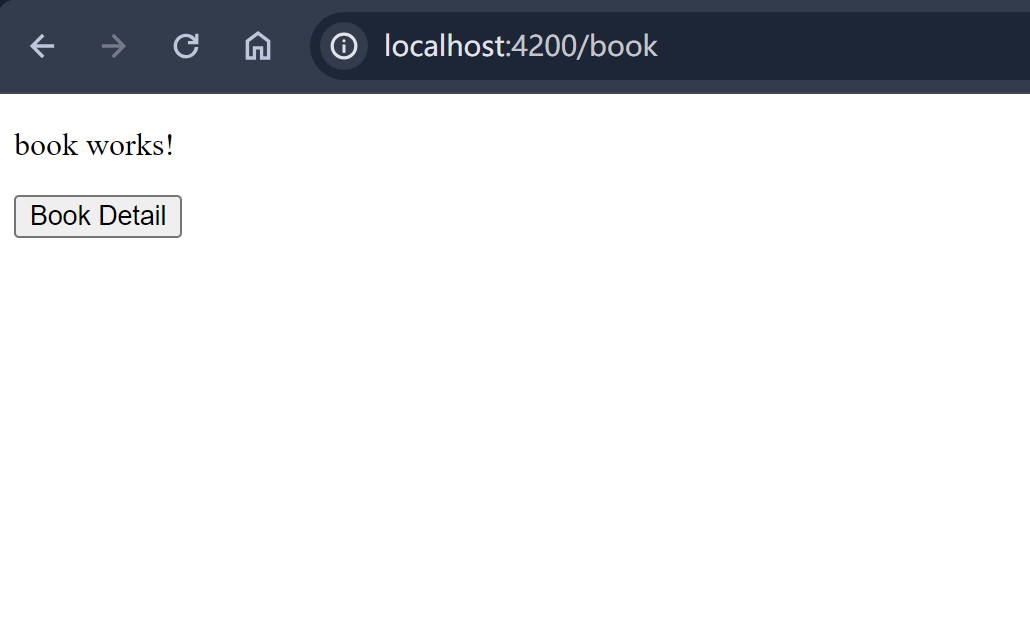
打开浏览器,访问http://localhost:4200/book

alt text

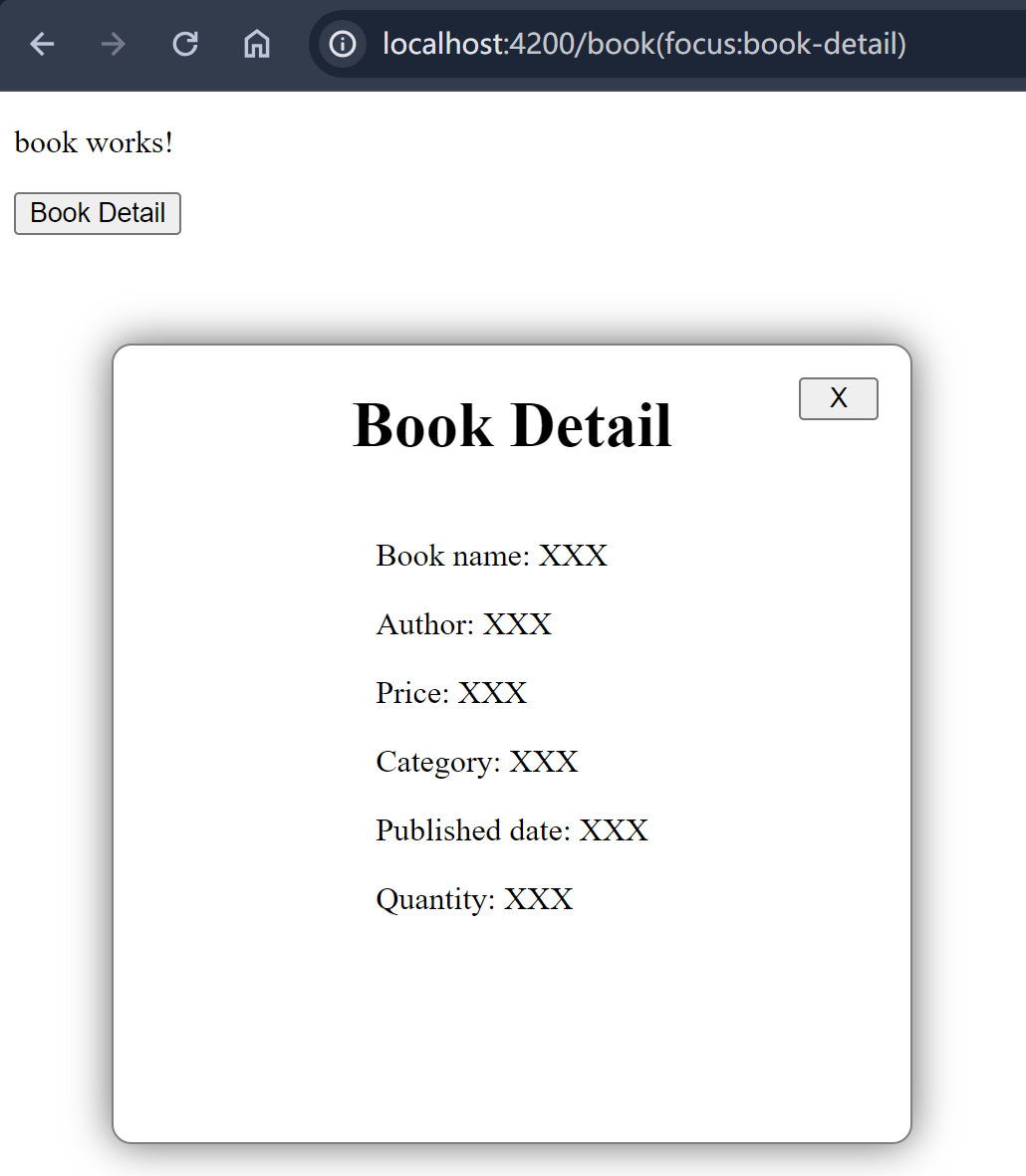
点击Book Detail按钮,弹出book-detail组件,此时路由变华为https://localhost:4200/book(detail:book-detail)

  • detail: 表示辅助路由的名称,定义在outlet属性中。
  • book-detail: 表示辅助路由的路径。定义在router文件中。

alt text

点击弹窗上的关闭按钮,关闭book-detail组件,路由恢复为http://localhost:4200/book

同时显示多个辅助路由。

添加一个book-list组件,点击Book List按钮时显示book-list弹窗。

1
ng generate component book-list

打开book-list.component.html文件,添加如下代码:

1
2
3
4
5
6
7
8
9
10
<div class="book-list">
<h1 class="book-list-title">Book List</h1>
<div class="book-list-body">
<p>Book 1</p>
<p>Book 2</p>
<p>Book 3</p>
<p>Book 4</p>
</div>
<button class="close-button" (click)="closeBookList()">X</button>
</div>

打开book-list.component.ts文件,添加如下代码:

1
2
3
4
5
6
7
8
export class BookListComponent {
constructor(private router: Router) {
}

closeBookList() {
this.router.navigate([{outlets: {list: null}}]);
}
}

打开book-list.component.css 添加样式

1
2
3
4
5
6
7
8
9
10
11
12
13
14
15
16
17
18
19
20
21
22
23
24
25
.book-list {
position: absolute;
top: 30%;
left: 30%;
transform: translate(-30%, -30%);
z-index: 9;
display: flex;
flex-direction: column;
align-items: center;

width: 400px;
height: 400px;

background-color: white;
border-radius: 10px;
border: 1px solid gray;
box-shadow: 0 0 20px rgba(0,0,0,0.6);
}

.close-button {
position: absolute;
top: 16px;
right: 16px;
width: 40px;
}

打开book.component.html文件,添加Book List按钮:

1
2
3
<p>book works!</p>
<button (click)="openBookList()">Book List</button>
<button (click)="openBookDetail()">Book Detail</button>

打开book.component.ts文件,添加按钮点击事件处理函数:

1
2
3
openBookList() {
this.router.navigate([{outlets: {list: 'book-list'}}]);
}

app.routes.ts文件中添加路由配置:

1
2
3
4
5
export const routes: Routes = [
{path: 'book', component: BookComponent},
{path: 'book-list', outlet: 'list', component: BookListComponent},
{path: 'book-detail', outlet: 'detail', component: BookDetailComponent},
];

打开app.component.html文件,添加Book List对应的outlet

1
2
3
<router-outlet />
<router-outlet name="detail"/>
<router-outlet name="list" />

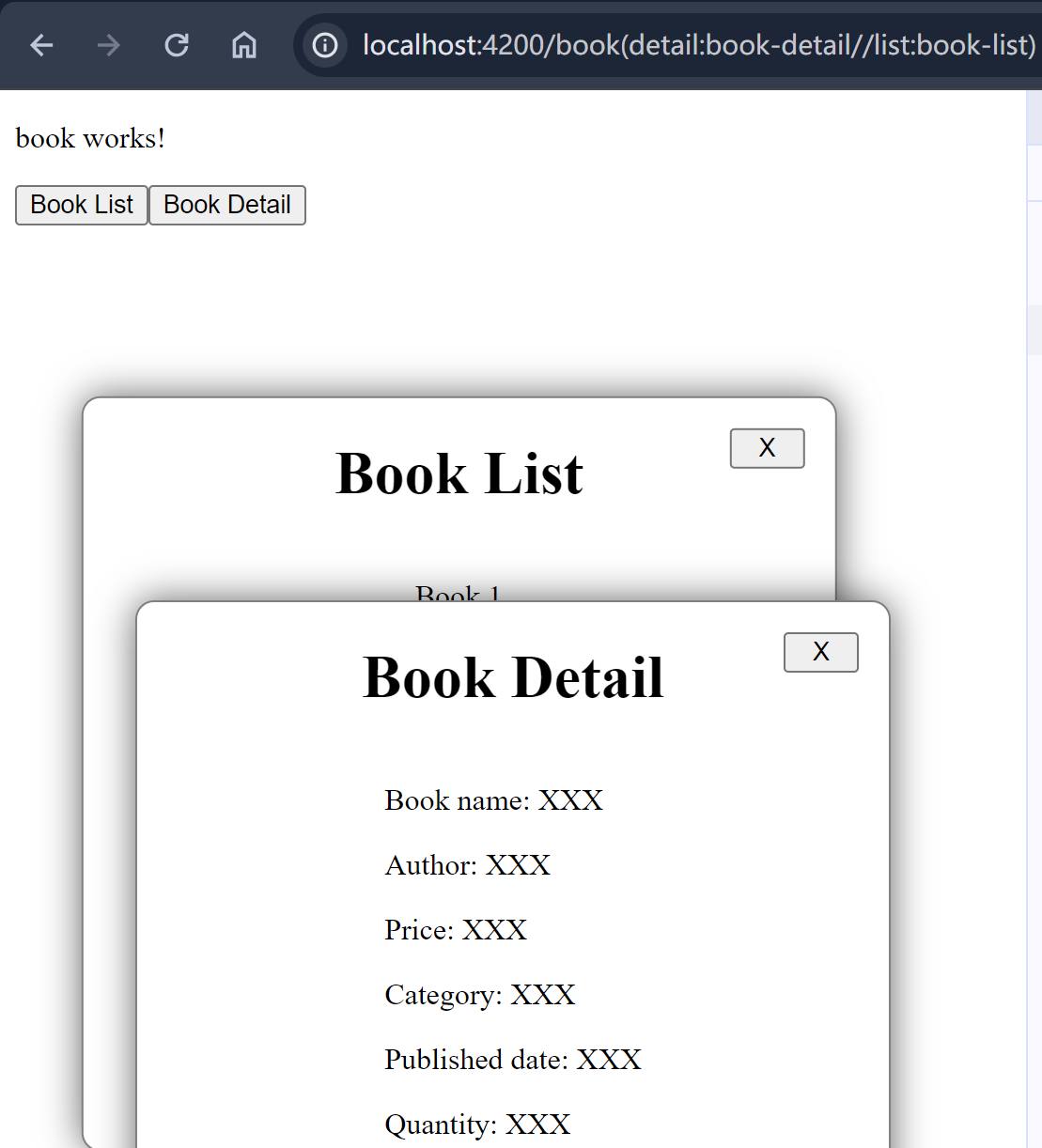
在次运行项目,依次点击Book ListBook Detail按钮,可以同时显示两个弹窗。观察此时路由的变化,注意有多个辅助路由时,按照路由outlet名字的字符串顺序显示,因为detail排在list前面,所以先显示detail,再显示list。无论先点击哪个按钮,路由顺序皆如此。

alt text

http://localhost:4200/book(detail:book-detail//list:book-list)

  • detail: 表示辅助路由的名称,定义在outlet属性中。
  • book-detail: 表示辅助路由的路径。定义在router文件中。
  • list: 表示辅助路由的名称,定义在outlet属性中。
  • book-list: 表示辅助路由的路径。定义在router文件中。
  • //: 用来分隔多个辅助路由。

不更改URL显示辅助路由

默认情况下,点击按钮后,路由会发生变化,URL会显示辅助路由的路径。如果不想更改URL,可以使用skipLocationChange选项。
book.component.ts文件中,添加按钮点击事件处理函数:

1
2
3
4
5
6
openBookList() {
this.router.navigate([{outlets: {list: 'book-list'}}], {skipLocationChange: true});
}
openBookDetail() {
this.router.navigate([{outlets: {detail: 'book-detail'}}], {skipLocationChange: true});
}

注意,如果有多个辅助路由,也要在关闭按钮点击事件处理函数中添加skipLocationChange选项,否则关闭一个弹窗时,另一个弹窗的URL会显示在地址栏中。

1
2
3
4
5
6
closeBookList() {
this.router.navigate([{outlets: {list: null}}], {skipLocationChange: true});
}
closeBookDetail() {
this.router.navigate([{outlets: {detail: null}}], {skipLocationChange: true});
}

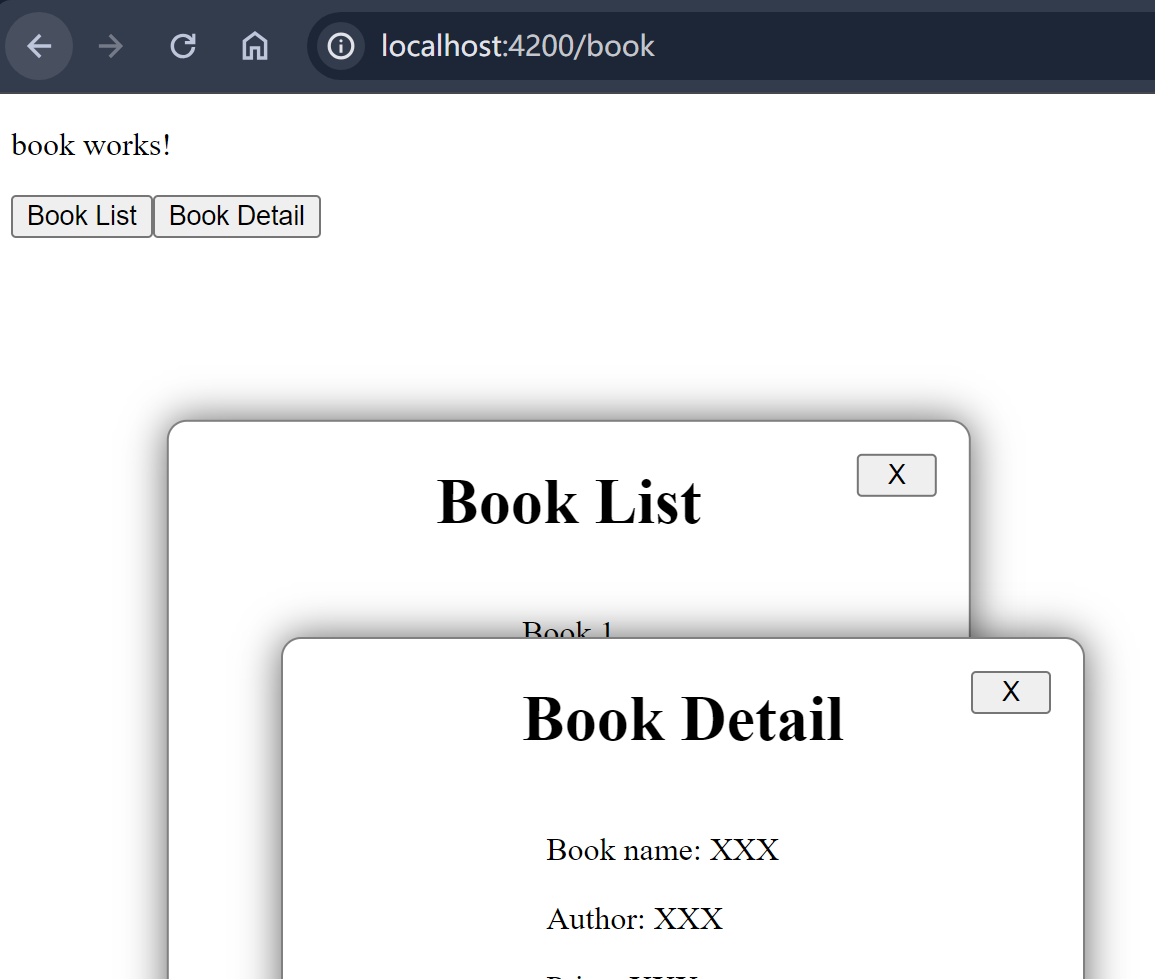
再次点击Book ListBook Detail按钮,可以看到URL没有发生变化。依次关闭两个弹窗,URL仍然保持不变。

alt text

使用routerLink显示辅助路由

上面的例子中,我们通过点击按钮,并且在按钮事件处理函数中调用navigate方法来显示辅助路由。也可以使用routerLink来显示辅助路由。
app.component.html文件中,使用routerLink显示辅助路由:

1
2
<a [routerLink]="[{outlets: {list: 'book-list'}}]">Book List</a>
<a [routerLink]="[{outlets: {detail: 'book-detail'}}]">Book Detail</a>

主路由和辅助路由各自独立

前面提起过,主路由和辅助路由是平级关系,二者可自由变化,互补影响,比如我们可以在book组件下添加一个子路由book1,然后在book1下再添加子路由book2

1
2
3
4
5
6
7
8
9
10
11
12
13
14
15
16
17
18
19
// app.routers.ts
export const routes: Routes = [
{
path: 'book',
component: BookComponent,
children: [
{
path: 'book1',
component: Book1Component,
children: [
{
path: 'book2',
component: Book2Component,
}
]
},
]
},
];
1
2
3
<!-- book.component.html -->
<p>book works!</p>
<router-outlet />
1
2
3
<!-- book1.component.html -->
<p>book1 works!</p>
<router-outlet />
1
2
<!-- book2.component.html -->
<p>book2 works!</p>

此时点击book-detail按钮,观察路由变化,辅助路由自动append到主路由后面,无论主路由的层级有多深。

1
http://localhost:4200/book/book1/book2(detail:book-detail)

同时显示主路由和辅助路由

主路由的outlet nameprimary,我们只需在routerLink或者navigate函数中指定primary即可。

通过routerLink属性触发(浏览器url:http://localhost:4200/book(detail:book-detail))

1
<a [routerLink]="[{outlets: {primary: 'book', detail: 'book-detail'}}]">Book and detail</a>

通过router.navigate方法触发(浏览器url:http://localhost:4200/book(detail:book-detail))

1
this.router.navigate([{outlets: {primary: 'book', detail: 'book-detail'}}]);

如果主路由对应多级path,直接指定即可,如下:(浏览器url:http://localhost:4200/book/book1/book2(detail:book-detail))

1
this.router.navigate([{outlets: {primary: 'book/book1/book2', detail: 'book-detail'}}]);

一次触发多个辅助路由

上面的例子中我们是依次点击按钮来显示辅助路由的,Angular也支持一次触发多个辅助路由,

可以在routerLink中同时定义多个辅助路由,在app.component.html文件中,添加如下代码,当我们点击Book List and Details按钮时,将同时显示book-listbook-detail组件。Url也将变为http://localhost:4200/book(detail:book-detail//list:book-list)

1
2
<!-- app.component.html -->
<a [routerLink]="[{outlets: {list: 'book-list', detail: 'book-detail'}}]">Book List and Details</a>
使用navigate方法

1
2
3
openBookListAndDetail() {
this.router.navigate([{outlets: {list: 'book-list', detail: 'book-detail'}}]);
}

总结

  • 辅助路由的格式:(outletname: path),比如(list:book-list), list对应outlet name, book-list对应path
  • 主路由和辅助路由是平级关系,他们的outlet要定义在一个文件中。比如上面例子中book和book-list,book-detail三者都是平级关系,所以他们的outlet都定义在app.component.html文件中。
  • outlet属性中name用来表示辅助路由的名称,不能包含-,不能是字符串primary,否则无法显示。
  • html文件中如果使用了routerLink,那么同时也要定义outlet,否则无法显示。